MOTOSHARE 🚗🏍️
Turning Idle Vehicles into Shared Rides & Earnings

From Idle to Income. From Parked to Purpose.
Earn by Sharing, Ride by Renting.
Where Owners Earn, Riders Move.
Owners Earn. Riders Move. Motoshare Connects.

With Motoshare, every parked vehicle finds a purpose. Owners earn. Renters ride.
🚀 Everyone wins.

Start Your Journey with Motoshare

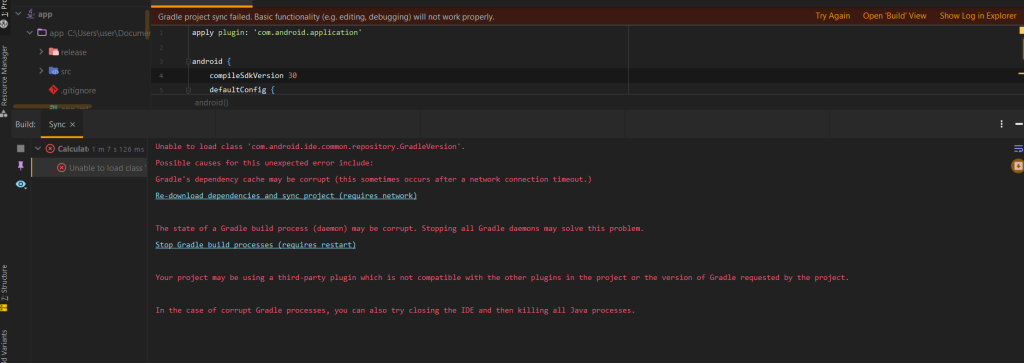
Error ‘Unable to load class ‘com.android.ide.common.repository.GradleVersion’.’ in Android Studio

Step 1: From the left panel in your IDE, choose the android folder (also known as the “Project” view).

Step 2: Look for the build.gradle file (the one inside the app module) then double-click it to start editing it.

Step 3: Inside the build.gradle file, locate the classpath line that states:

classpath 'com.android.tools.build:gradle:3.2.1'

Change the version to the desired version of the Android Gradle Plugin that is compatible with your Android Studio. For example, if you want to update it to version 3.3.0, modify it to:

classpath 'com.android.tools.build:gradle:3.3.0'

Step 4: After finishing Steps 1 to 3, go to the gradle folder in the root directory of your project.

5: Double-click on the wrapper subfolder.

Step 6: Click on the gradle-wrapper.properties file to start editing it.

Step 7: In the gradle-wrapper.properties file, make sure that your Gradle version is compatible with the Android Gradle Plugin version you specified in Step 3. You can do this by checking and updating the distributionUrl line to the desired version.

For example:

distributionUrl=https\://services.gradle.org/distributions/gradle-4.10.2-all.zip

Related Posts

Master Kubernetes Skills in Chennai

In Chennai’s evolving technology landscape—from the IT corridors of OMR to the innovation hubs of Guindy and Siruseri—a significant transformation is reshaping infrastructure careers. Kubernetes has moved…

Master Kubernetes in Bangalore: Your Path to Cloud-Native Excellence

Across Bangalore’s dynamic tech landscape—from the established corridors of Electronic City to the innovation hubs of Whitefield and the emerging tech parks of Sarjapur Road—a significant shift…

Mastering Jira in Pune: Your Guide to Project Management Success

Pune’s transformation into a technology powerhouse is creating exciting new opportunities for professionals across the city. From the established IT hubs in Hinjewadi and Magarpatta City to…

Mastering Jira in Mumbai: Your Path to Agile Excellence and Career Growth

Navigating Mumbai’s fast-paced professional landscape can feel overwhelming—especially when you’re trying to keep up with evolving project management demands while managing expectations across Andheri’s tech parks, Bandra’s…

Master Jira Project Management in Kolkata

Have you noticed how Kolkata’s professional landscape is changing? Once known primarily for its traditional industries, the City of Joy is rapidly transforming into a significant technology…

Jira Training in Hyderabad: Your Path to Agile Excellence and Career Growth

Are you in Hyderabad’s bustling tech scene and finding that your basic Jira knowledge just isn’t cutting it anymore? You’re in good company. Many professionals in the…

0 0 votes
Article Rating
Subscribe
Notify of
guest
0 Comments
Oldest
Newest Most Voted
Inline Feedbacks
View all comments
0
Would love your thoughts, please comment.x
()
x