MOTOSHARE 🚗🏍️
Turning Idle Vehicles into Shared Rides & Earnings

From Idle to Income. From Parked to Purpose.
Earn by Sharing, Ride by Renting.
Where Owners Earn, Riders Move.
Owners Earn. Riders Move. Motoshare Connects.

With Motoshare, every parked vehicle finds a purpose. Owners earn. Renters ride.
🚀 Everyone wins.

Start Your Journey with Motoshare

Flutter: Conditional Statements If-Else

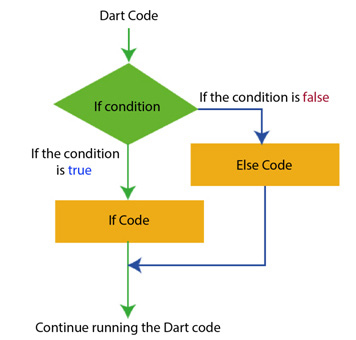
The if-else statement is a fundamental construct in programming that allows you to execute different blocks of code based on specific conditions. In Flutter, if-else statements are used extensively to control the flow of your application’s logic and user interface.

Syntax of If-Else Statements in Dart (Flutter’s Programming Language):

The syntax of an if-else statement in Dart is as follows.

if (condition) {
  // Code to execute if the condition is true
} else {
  // Code to execute if the condition is false
}

In this syntax:

  • condition is a boolean expression that evaluates to either true or false.
  • The code block inside the if statement is executed if the condition is true.
  • The code block inside the else statement is executed if the condition is false.

Example: Using If-Else Statements in Flutter Widgets:

Let’s consider a simple example where we want to display a message based on whether a user is logged in or not. We can achieve this using if-else statements in Flutter widgets.

import 'package:flutter/material.dart';

class HomePage extends StatelessWidget {
  final bool isLoggedIn = true;

  @override
  Widget build(BuildContext context) {
    return Scaffold(
      appBar: AppBar(
        title: Text('Conditional Statements in Flutter'),
      ),
      body: Center(
        child: isLoggedIn
            ? Text('Welcome, User!')
            : Text('Please log in to continue.'),
      ),
    );
  }
}

void main() {
  runApp(MaterialApp(
    home: HomePage(),
  ));
}

We define a boolean variable isLoggedIn that determines whether the user is logged in.

Inside the build method of the HomePage widget, we use an if-else statement to conditionally display different messages based on the value of isLoggedIn.

If isLoggedIn is true, we display a welcome message. Otherwise, we prompt the user to log in.

Related Posts

Master Makefiles: Automate Your Development Workflow

In the world of software development and DevOps, efficiency is paramount. One of the most powerful, yet often overlooked tools for achieving this efficiency is the humble…

Master Linux: Your Foundation for Modern Technology Careers

In today’s rapidly evolving technology landscape, Linux Training has become more essential than ever. From cloud infrastructure and DevOps environments to cybersecurity and enterprise servers, Linux serves as the…

Master Kubernetes Skills with Expert-Led Learning in Pune

Accelerate Your Tech Career: A Complete Guide to Kubernetes Mastery in Pune Pune stands proudly as one of India’s leading technology epicenters, celebrated not only as the…

Master Cloud-Native Skills with Expert-Led in the Netherlands

Elevate Your Tech Career: A Guide to Mastering Kubernetes in the Netherlands The Netherlands stands at the forefront of European digital innovation, with a thriving ecosystem of…

Master Container Orchestration with Expert-Led in Mumbai

The bustling tech landscape of Mumbai demands cutting-edge skills, and mastering container orchestration is at the forefront. For professionals aiming to lead in cloud-native development, finding the…

Master Kubernetes Skills for Kolkata’s Tech Sector

Kolkata’s technology ecosystem is experiencing a remarkable transformation, evolving from its historical strengths into a vibrant hub for modern IT services, startups, and digital innovation. As businesses…

5 2 votes
Article Rating
Subscribe
Notify of
guest
0 Comments
Oldest
Newest Most Voted
Inline Feedbacks
View all comments
0
Would love your thoughts, please comment.x
()
x