MOTOSHARE 🚗🏍️
Turning Idle Vehicles into Shared Rides & Earnings

From Idle to Income. From Parked to Purpose.
Earn by Sharing, Ride by Renting.
Where Owners Earn, Riders Move.
Owners Earn. Riders Move. Motoshare Connects.

With Motoshare, every parked vehicle finds a purpose. Owners earn. Renters ride.
🚀 Everyone wins.

Start Your Journey with Motoshare

Adding Internet Permission in Android: A Quick Guide

Ensuring your Android application has the necessary permissions to access the internet is crucial, especially when dealing with network operations. In this guide, we’ll walk you through the simple process of adding internet permission to your Android app by modifying the AndroidManifest.xml file.
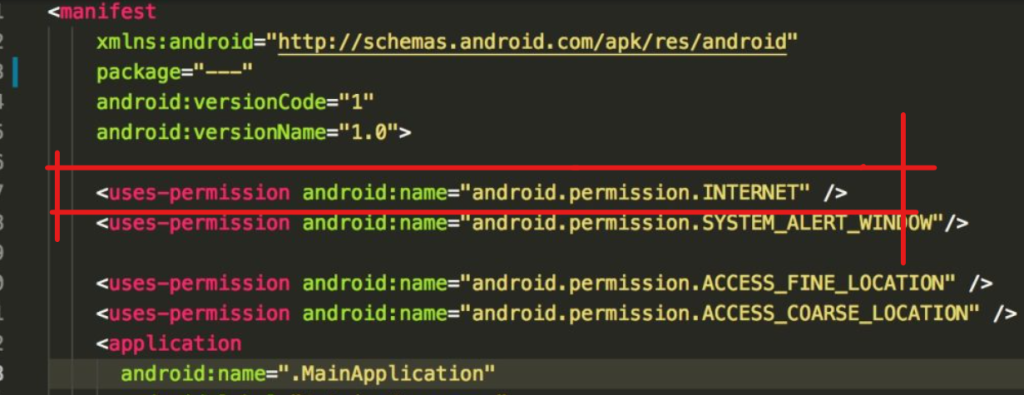
Locate AndroidManifest.xml

Navigate to your Android project’s directory and follow the path: app -> src -> main -> AndroidManifest.xml. This file contains essential configuration settings for your Android application.

Copy the Permission Code

Copy the following line of code which grants internet permission to your app:

<uses-permission android:name="android.permission.INTERNET"/>

Insert the Code in AndroidManifest.xml

Paste the copied line of code inside the <manifest> tag in your AndroidManifest.xml file. Ensure it is placed just before the <application> tag. Here’s an example:

<?xml version="1.0" encoding="utf-8"?>
<manifest xmlns:android="http://schemas.android.com/apk/res/android"
    package="com.example.popupmenu">
    <uses-permission android:name="android.permission.INTERNET"/>
    <application
        android:allowBackup="true"
        android:icon="@mipmap/ic_launcher"
        android:label="@string/app_name"
        android:roundIcon="@mipmap/ic_launcher_round"
        android:supportsRtl="true"
        android:theme="@style/Theme.PopupMenu">
        <!-- Your app's activities and configurations go here -->
        <activity android:name=".MainActivity">
            <intent-filter>
                <action android:name="android.intent.action.MAIN" />
                <category android:name="android.intent.category.LAUNCHER" />
            </intent-filter>
        </activity>
    </application>
</manifest>

Hope, successfully added internet permission to your Android app.

Related Posts

Boost Code Quality with SonarQube for Hyderabad Developers

SonarQube Training in Hyderabad gives developers hands-on skills to check code quality and find problems early. This training teaches automated analysis to make software cleaner and safer….

Mastering SonarQube for Superior Code Quality in Chennai

SonarQube Training in Chennai delivers practical skills to enhance code quality and detect issues early. Developers gain expertise in automated static analysis for cleaner software. The program…

Mastering SonarQube for Bangalore’s Tech Professionals

SonarQube helps check code quality and find problems early. This guide covers SonarQube training in Bangalore. It shows what SonarQube does, the full class plan, costs, jobs with…

Master Selenium Skills for Pune’s Tech Industry Today

Selenium simplifies web app testing across all major browsers making development cycles faster and more reliable. This comprehensive guide explores Selenium Training In Pune, covering everything from fundamental…

Selenium Expertise & Career Prospects in Kolkata

Selenium makes testing web apps simple and fast across browsers. This guide covers Selenium Training In Kolkata, with basics, learning path, costs, job options, and why Kolkata fits…

Master Selenium for High-Paying Tech Jobs in Hyderabad

Selenium helps teams test web apps fast across different browsers. This guide looks at Selenium Training In Hyderabad, sharing basics, what you’ll learn, costs, job chances, and why…

0 0 votes
Article Rating
Subscribe
Notify of
guest
0 Comments
Oldest
Newest Most Voted
Inline Feedbacks
View all comments
0
Would love your thoughts, please comment.x
()
x