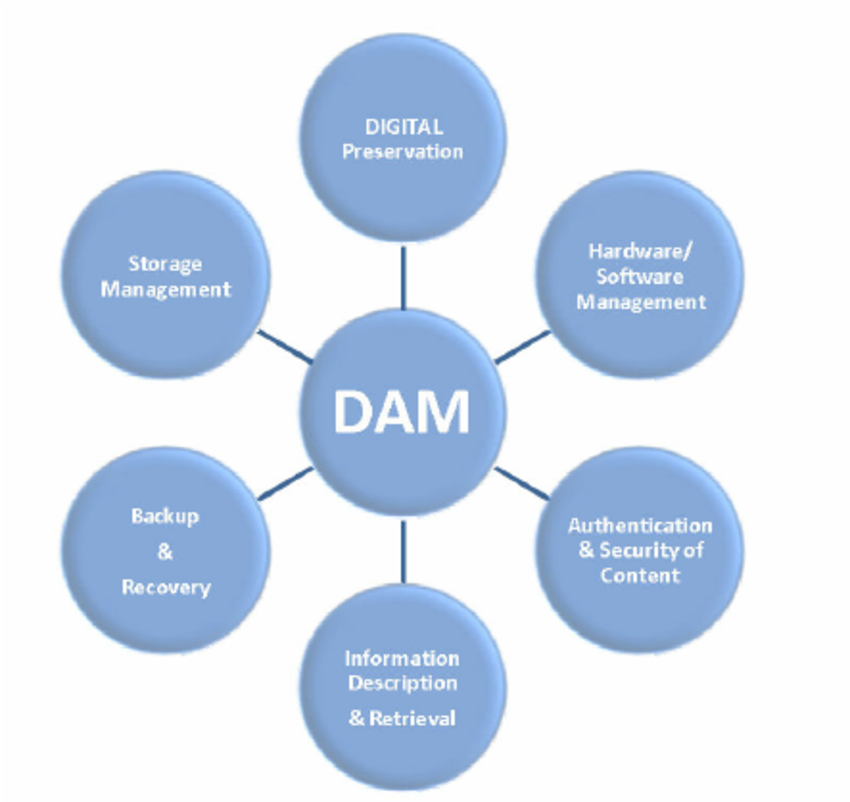
Digital Asset Management (DAM) software is a solution that helps organizations store, organize, manage, and share their digital assets. Digital assets can include any type of digital file, such as images, videos, audio files, documents, and presentations. DAM software provides a centralized repository for all of your digital assets, In today’s digital age, businesses and organizations are inundated with a plethora of digital assets such as images, videos, documents, graphics, and more. Managing these assets efficiently and effectively is crucial for maintaining brand consistency, improving productivity, and streamlining workflows. This is where Digital Asset Management (DAM) software comes into play.
Digital Asset Management (DAM) software is a centralized platform designed to store, organize, manage, and distribute digital assets in a streamlined and secure manner. These assets can include images, videos, audio files, documents, design files, and more. DAM software not only acts as a digital library but also provides tools for searching, retrieving, sharing, and collaborating on these assets.
Why Do You Need DAM Software?
DAM software can be beneficial for organizations of all sizes, but it is especially important for businesses that rely heavily on digital content. DAM software can help you to:
- Improve efficiency: DAM software can help you to save time and improve efficiency by automating many of the tasks involved in managing digital assets.
- Increase productivity: DAM software can help your team to be more productive by providing them with easy access to the files they need.
- Improve collaboration: DAM software can help to improve collaboration within your team and with external partners by providing a central place to share and review digital assets.
- Reduce costs: DAM software can help you to reduce costs by eliminating the need to store and manage digital assets on multiple servers or devices.
- Protect your assets: DAM software can help to protect your digital assets from loss or theft by providing secure storage and access controls.
Features of DAM Software
DAM software typically includes a variety of features, such as:
- Centralized storage: DAM software provides a centralized location to store all of your digital assets. This makes it easy to find and access the files you need, no matter where you are located.
- Organization and search: DAM software allows you to organize your digital assets into folders and collections. You can also search for assets by filename, keyword, or other criteria. Allows users to add metadata tags, keywords, and descriptions to assets, making them easily searchable.
- Version control: DAM software keeps track of all changes to your digital assets, so you can always revert to a previous version if necessary.
- Security: DAM software provides access controls to ensure that only authorized users can access your digital assets.
- Sharing: DAM software makes it easy to share digital assets with others, either internally or externally.
Importance of DAM Software
Organization: DAM software offers a structured and organized way to store digital assets. It eliminates the need for chaotic file systems, reducing the risk of misplacing or losing important files.
Collaboration: Collaborating on digital assets becomes seamless as DAM software allows multiple users to access and work on the same assets simultaneously. This is particularly important for design teams and content creators.
Version Control: Keeping track of different versions of a digital asset can be challenging. DAM software ensures version control, making it easy to revert to or compare previous versions.
Brand Consistency: Maintaining brand consistency is essential for businesses. DAM software ensures that all brand assets, like logos, fonts, and templates, are readily available for employees and partners, reducing the risk of using outdated or incorrect materials.
Security: DAM software provides robust security features, including user permissions and access controls, to protect sensitive and confidential assets from unauthorized access.
Benefits of DAM Software
- Improved Efficiency: DAM software streamlines asset management, saving time and reducing the risk of errors.
- Cost Savings: Avoid the need to recreate lost assets and reduce the risk of copyright violations by using the correct, licensed materials.
- Increased Productivity: Easy access to assets ensures that teams can focus on creative work rather than searching for files.
- Enhanced Collaboration: Teams can collaborate on assets in real-time, regardless of their physical location.
- Brand Consistency: Maintain a consistent brand image with easy access to the latest brand assets.
Popular DAM Software Options
- Adobe Experience Manager: A comprehensive DAM solution from Adobe that offers seamless integration with their creative tools.
- Widen Collective: A cloud-based DAM system known for its user-friendly interface and scalability.
- Bynder: A DAM solution that focuses on creative project management and brand management.
- Canto: A user-friendly, cloud-based DAM software suitable for small to medium-sized businesses.
- Wrike: A versatile project management tool that includes DAM features for seamless collaboration and asset management.
